Watch from the top,answer with a nod

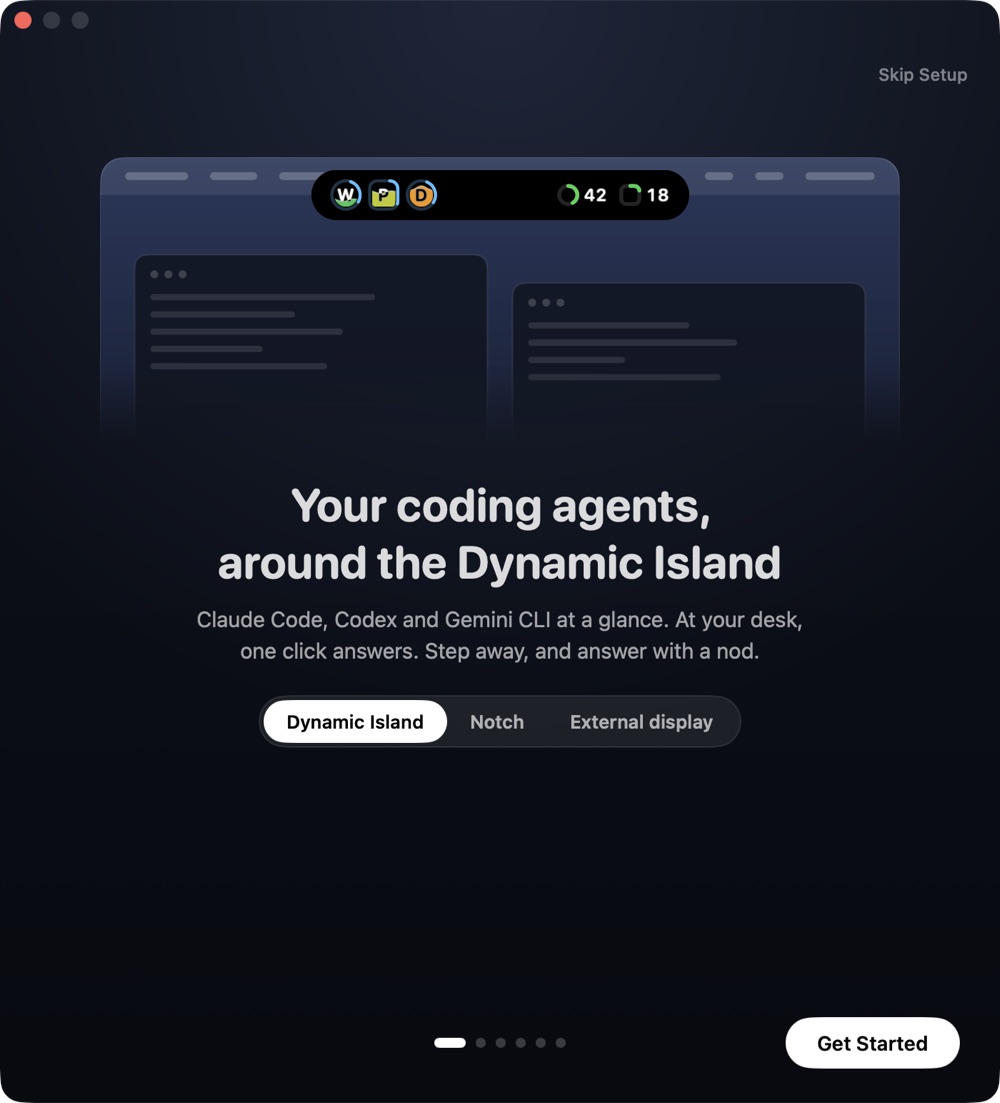
Every Claude Code, Codex and Gemini CLI session, live around your MacBook Pro's Dynamic Islandyour MacBook's notchthe top of any display. One click at your desk, or a nod from across the room.

Every agent, one glance

Each dot is a session: round for Claude Code, square for Codex. Blue means it's working, and water shows how full its context is.

Amber means it needs you

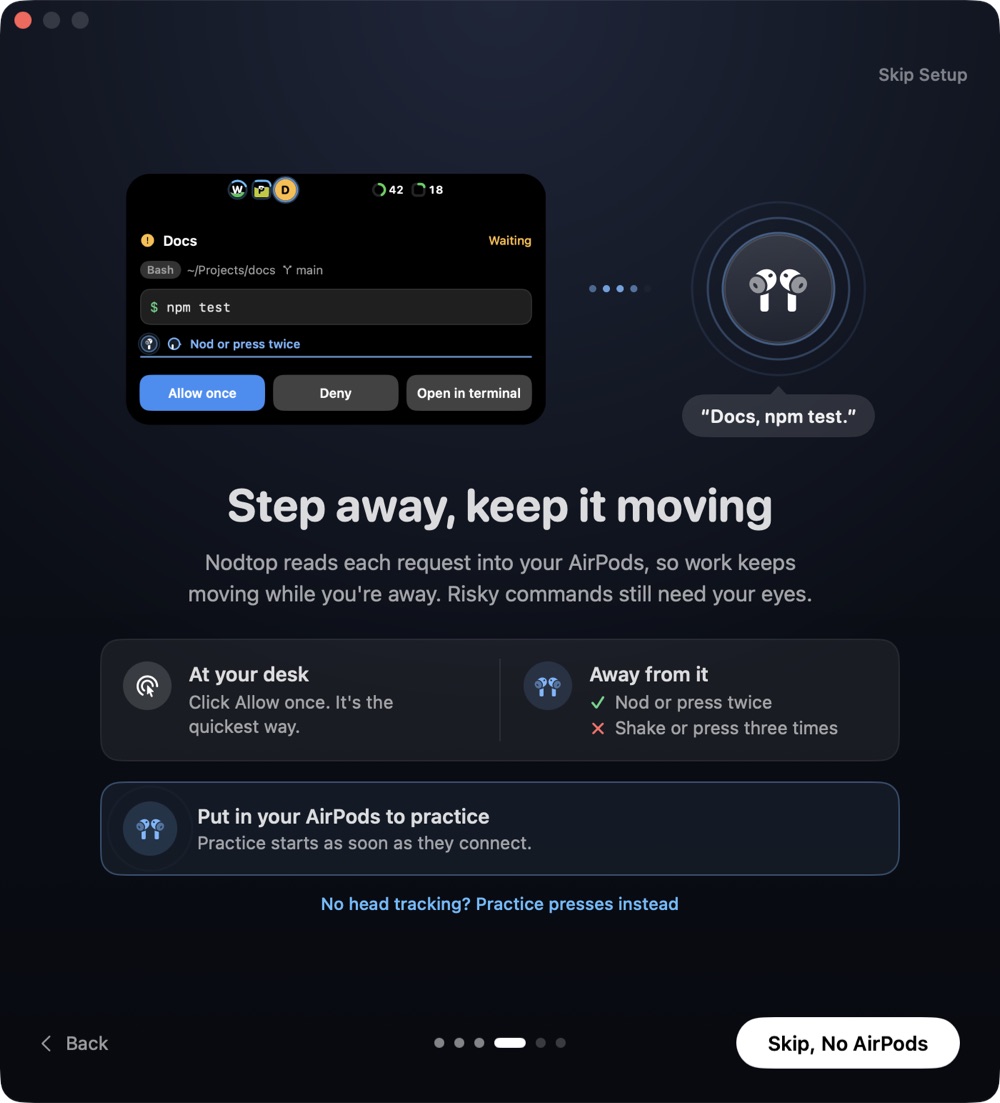
Docs wants to run a command. You hear “Docs, cd command, and more.” in your AirPods.

The whole command, never a summary

It opens into a card that shows exactly what will run, and listens for your answer.

Nod twice, or press twice

The card gets out of your way, and a green ring gives you a moment to shake it back. Then it's allowed.

Green means done

You hear “Docs is done. Tests pass.” Tap any session to jump to its terminal tab.
At a glance

Nod to approve. Nod twice, and a green ring gives you a moment to shake it back. Two stem presses work too.

Risky needs your eyes. Deleting files or force-pushing is never approved by a nod, and the card always shows the whole command.

Context in every dot. Water rises as a session fills its context, from green to red, so you see which one is close to full.

Both agents’ limits. Claude Code and Codex, each in its own shape, with when they reset. A reset gets its own little moment.6

“Docs is done. Tests pass.”

Hear when it's done. A one-line summary of each finished turn, spoken in your AirPods.

webpipelinedocsapi

Jump to the exact tab. Tap a session and land on its terminal tab, even with dozens open. Inside tmux, its pane too.4

Any Mac, any display. Around the Dynamic Island or the notch, or as a pill under the menu bar on any other display.7

It all stays on your Mac. No account and no server. Prompts and commands are never saved.

Know your limits

Context fills each dot like water. Your Claude Code and Codex limits sit beside them, with when they reset.6

Context in every dot

Water rises as a session fills its context, from green to red.

Both agents, side by side

While a session is open, Claude Code and Codex each get a gauge in their own shape.

Pace and reset times

Hover to see when each limit resets, and whether you’ll run out first. A reset gets its own moment.

Eyes-free

Step away, keep it moving

At your desk, a click is quickest. Away from it, making coffee or stretching your legs, Nodtop reads each request into your AirPods and takes your answer by a nod or a press, so the work doesn’t wait for you.

  1. It speaks in your ear

    You’re at the coffee machine. The request is read out once, in a calm voice.

  2. Then it listens

    Until you answer, a nod, a shake or a stem press can answer. Nothing else counts.

  3. Nod twice

    Like saying “yes, yes”.

  4. A moment to change your mind

    A rising tone and a green ring start a 1.5 second window. Shake or press to cancel it.

  5. Approved, without looking

    The session gets back to work while you finish your coffee.

Four ways to answer

Nod twice

Approve1

Shake

Decline1

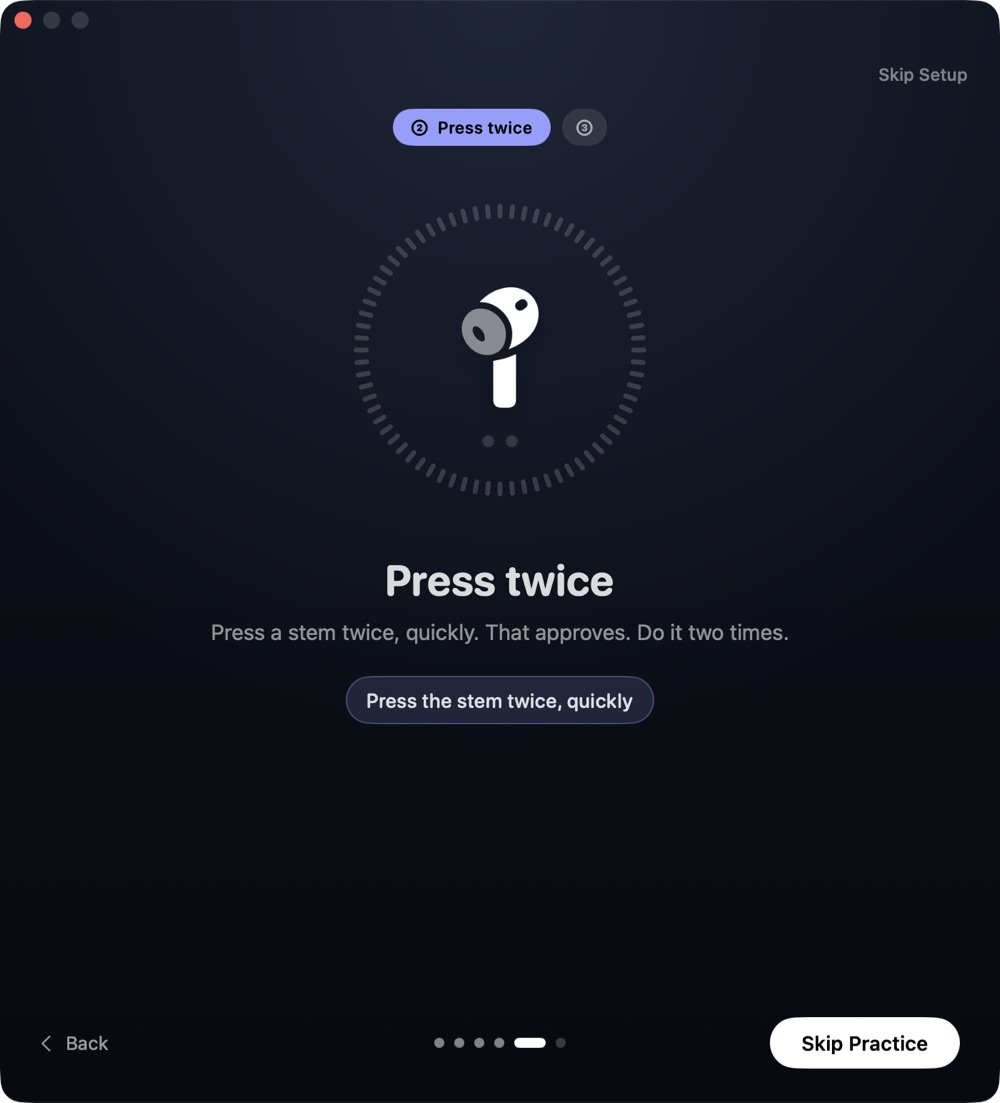
Press twice

Approve2

Press three times

Decline2

Risky commands, like deleting files or force-pushing, need your eyes by default. And if you don't answer, nothing happens: the prompt waits in your terminal.

Your music keeps playing

Prompts speak in the AirPod you're wearing, while the music carries on a little quieter, or pauses if you prefer. You choose the side, how far the music dips, and what gets spoken.3

Works with Apple Music and Spotify. The volume always comes back, even if the app quits mid-sentence.

Make it yours

Nearly everything Nodtop does is a setting. Start with the defaults, then tune what it approves, what it says and how it looks.

What a nod may approve

Off, known-safe only, all but flagged, or every request. Shell commands, file edits, web access and other tools each have their own switch.

Nods, presses or both

Choose how you answer, how long a double nod can be taken back, and whether Nodtop listens until you answer.

What you hear, and where

Which ear the voice uses, and which lines are spoken: prompts, finished turns, errors and long tasks.

Your music, your way

Lowered to the level you pick, or paused while Nodtop speaks. Apple Music or Spotify.

The Island’s shape

On a display without a notch: a pill, a Dynamic Island or a notch, as far from the top as you like.

Usage, shortcuts and sounds

Which limit shows, whether resets celebrate, two keyboard shortcuts, and the chimes.

Careful by design

An agent that runs commands on your Mac deserves a careful yes.

The real command, every time

The card shows exactly what will run, with hidden characters made visible. Never the agent's own description of it.

Risky needs your eyes

Deleting and force-pushing need your eyes by default, and anything too long to read in full always does. If you choose, a double press after a spoken warning can approve them, never a nod.

Silence never approves

No answer, a lost connection or a closed app leaves the choice with your terminal.

One yes, one request

There's no “always allow”. Each approval covers a single command.

A beat before Allow

Buttons arm after a short pause, so a stray click or keystroke can't approve.

Stays on your Mac

Prompts and commands are never saved, logged or sent anywhere. No account, no server.

Works where you work

Tap a session in the IslandnotchIsland and land on its exact tab. Inside tmux, its window and pane too.4

webpipelinedocs

$ npm run dev watching for changes

$ python import.py batching writes

$ npm test tests pass

Terminals

  • TerminalIts exact tab
  • iTerm2Its exact tab
  • GhosttyIts exact tab
  • tmuxIts window and pane

Agents

  • Claude Code

    Status, cards, spoken prompts and answers by ear.

  • Codex

    Status, and answers from the card.5

  • Gemini CLI

    Status dots, for now.5

Set up in a minute

A welcome that shows you around, then a quick game that learns your nod and shake, and the presses.

The welcome window: your coding agents, around the Dynamic Island.
Practice: press the stem twice, with a glowing AirPod in a ring of ticks.
Step away: a card for npm test, read into your AirPods.

What you need

Mac
Any Mac on macOS 14 or later: a MacBook with a notch or the new Dynamic Island, or a Mac mini or other Mac with any display.7
Agents
Claude Code. Codex, with answers from the card. Gemini CLI for status. Usage limits for Claude Code and Codex.5
Terminals
Terminal, iTerm2, Ghostty 1.3 or later, and tmux. Other apps are brought to the front.
Head gestures
AirPods Pro, AirPods (3rd generation), AirPods 4 or AirPods Max.1
Stem presses
AirPods with stem controls.2
Music
Apple Music and Spotify.
Privacy
Runs on your Mac. No account. Nodtop sends nothing anywhere.

Common questions

Does it change how Claude Code works?

No. It adds hooks to Claude Code's settings, after making a backup. Claude Code's own prompt still appears in your terminal, and you can answer there as always. Remove the hooks from Settings at any time. If you turn on usage, it also adds a small relay to the status line, and your own status line keeps running.

Why nod when I could just click?

At your desk, do click: it’s the quickest way. Nods and presses are for when you’re away from the screen, making coffee or across the room, so a session doesn’t sit waiting until you’re back.

What if I nod by accident?

Two nods start a 1.5 second window with a rising tone. Shake or press to cancel. By default, risky commands can't be approved by ear at all.

Do I need AirPods?

No. The status dots, the cards and jumping to your terminal work on their own. AirPods add spoken status and answering by ear.

Can people around me hear the prompts?

Speech plays only through headphones, never your Mac's speakers. If your AirPods disconnect, it stops.

Is anything sent to a server?

No. Everything runs on your Mac. There's no account, and prompts and commands are never stored.

Can I change what’s approved by ear?

Yes. In Settings › Answer by Ear, choose Off, Known-safe only, All but flagged (the default) or Every request, and switch off any kind of tool. Shaking your head or pressing three times always declines.

Does it read my usage?

Only percentages, reset times and each session’s context level. Prompts and commands aren’t read, and Nodtop sends nothing anywhere. You can turn the usage view off in Settings.

When can I get it?

It's in final testing. The download will be here when it's ready.

Look up less

For any Mac, with a notch, a Dynamic Island or any display. One download, no account.